
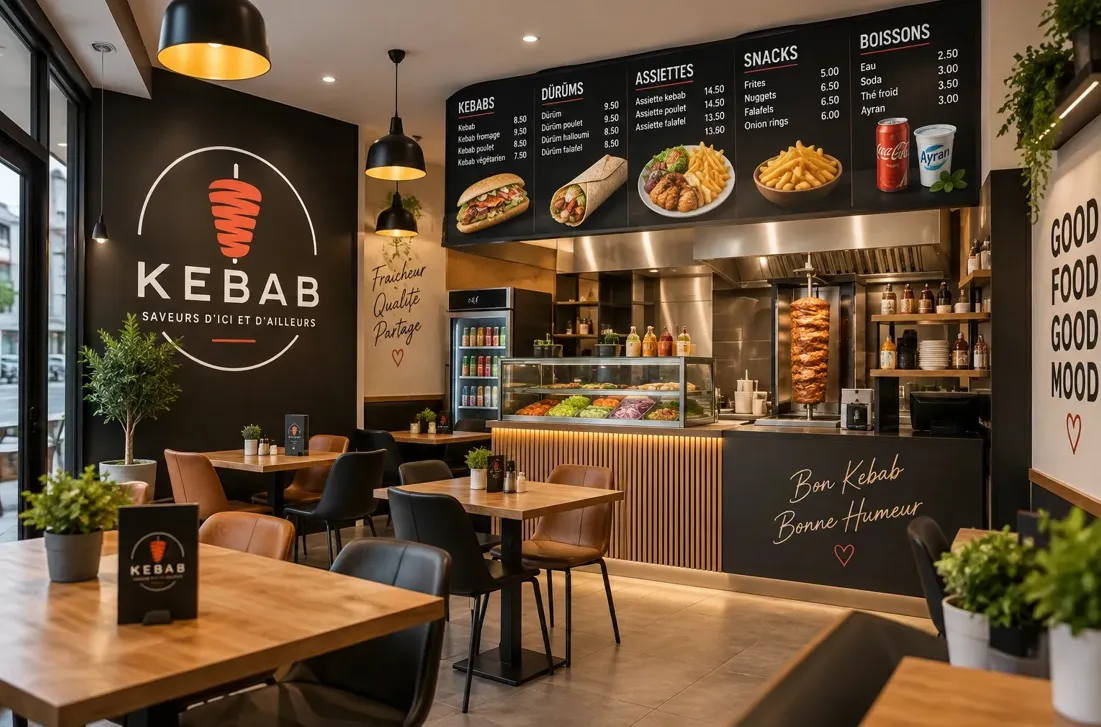
A restaurant menu must help customers choose food and help the kitchen prepare it. This balance becomes more important when orders arrive through a website. Guests cannot ask a server to explain every dish, confirm an ingredient, or suggest an alternative. The digital menu must provide enough information for a customer to place an accurate order without slowing down the decision.
Online ordering also changes kitchen operations. Orders can arrive from several customers within a short period. Each order may include additions, removals, delivery details, and a requested collection time. A clear menu and a controlled order process reduce mistakes before food preparation begins.
Restaurants can improve this process through four practical steps. They can simplify the menu, configure the ordering system, connect time slots to kitchen capacity, and use order data to improve future decisions.
Create a Menu That Customers Can Order Quickly
Start menu planning with a clear restaurant menu structure. Group dishes into categories that customers recognise, such as starters, main courses, sides, desserts, drinks, vegetarian dishes, and family meals. A customer should understand the menu after a short scan.
Use direct dish names. The name should identify the main food instead of relying on an internal kitchen term or a creative phrase that needs a long explanation. A clear name such as grilled chicken rice bowl communicates more than a name that has no connection to the ingredients.
Write a short description for each dish. State the main ingredients, cooking method, sauce, side, and level of heat. Keep the most useful information near the start. Customers should not need to open several screens to learn what they will receive.
List the portion or serving size when it affects the purchase decision. A family tray, personal pizza, sharing platter, and single dessert serve different needs. A practical quantity reduces complaints and helps customers compare value.
Show the full price before checkout. Add the price of each size, option, and extra ingredient beside the relevant choice. Customers should see how a selection changes the total before they add the item to the basket.
Limit customisation to choices the kitchen can handle consistently. Common options may include spice level, sauce, side, protein, size, or removal of an ingredient. Too many open text fields create unclear requests and increase preparation errors.
Use required options only when the kitchen needs a decision. A pizza size, type of rice, or collection location may require an answer. An optional extra should remain optional. The order form should not force customers to select an unnecessary addition.
Set sensible limits for extras. A customer may choose one side, two sauces, or up to three toppings. Clear limits protect food cost and keep the kitchen ticket readable.
Identify major allergens accurately. Restaurants should follow the food information rules that apply in their location. A digital menu can display allergen information, but staff still need a process for recipe changes, ingredient substitutions, and cross-contact questions.
Do not use a label such as allergen-free unless the kitchen can support that statement. A dish without a listed ingredient may still face cross-contact during storage or preparation. Give customers a clear method for contacting the restaurant before ordering when they have a serious allergy.
Add dietary labels only after checking the complete recipe. Vegetarian, vegan, gluten-free, dairy-free, and nut-free labels must account for sauces, garnishes, cooking fats, stocks, and shared equipment. One incorrect label can create a safety risk.
Use real food photographs in the digital menu when possible. The image should represent the portion, container, toppings, and presentation that the customer will receive. Keep lighting and framing consistent across the menu. An accurate photograph supports trust better than an exaggerated image.
Compress images so the menu loads quickly on a phone. Large image files can delay the page and interrupt ordering on a weak connection. Test the menu on mobile data as well as a fast office network.
Arrange dishes in a logical order. Place common choices near the top of each category. Keep unavailable or seasonal items hidden instead of making customers discover the problem at checkout. Mark sold-out items promptly.
Review the menu from the customer’s point of view. Ask a person who did not build it to order a meal for one person, a vegetarian group, and a family. Record any unclear name, missing price, confusing option, or unavailable combination.
Set Up a Simple Restaurant Ordering System
A restaurant ordering system should connect the customer, digital menu, kitchen, and collection or delivery process. In French, Logiciel commandes restaurant means “restaurant ordering software.” The phrase describes a tool that helps a restaurant receive and organise food orders through its own online ordering channel.
Choose the order types the restaurant can fulfil reliably. These may include takeaway orders, click and collect, delivery orders, or table ordering. Do not activate a service only because the software supports it. The kitchen workflow, staff, packaging, and delivery process must also support it.
Define the service area for delivery. Use clear zones, postal codes, or distance limits. State the delivery charge and minimum order before checkout. A customer should know whether an address is eligible before spending time building a basket.
Set realistic opening hours. Online ordering hours may differ from restaurant opening hours. The kitchen may need to stop accepting new delivery orders before closing so staff can prepare and dispatch them on time.
Connect every menu item to its availability. Breakfast dishes may end at a set hour. A weekend special may appear only on selected days. A limited item should stop accepting orders when its available quantity reaches zero.
Use stock controls for products with a fixed daily quantity. If the kitchen prepares 20 portions of a special dish, the ordering system should not accept the twenty-first order. Staff should also be able to update availability quickly during service.
Configure preparation times by order type. A takeaway order may need 20 minutes, while a delivery order may need additional dispatch time. Large orders may need a longer lead time than one meal. The promised time should reflect the full process.
Offer a short and clear checkout. Ask only for information needed to prepare, identify, and deliver the order. Typical fields include name, verified contact method, selected time, collection or delivery choice, address when required, and payment method.
A verified email address or phone number reduces false bookings and gives the restaurant a reliable way to send order updates. The verification step should remain simple and should not force the customer to create a password for a single purchase.
Show the complete order before confirmation. The review screen should include dishes, quantities, options, extras, delivery or collection method, selected time, address, fees, and final price. Customers need a clear chance to correct a mistake.
Choose payment methods that suit the local market. These may include card payments, mobile wallets, a national payment service, or payment at collection. Explain when the payment will be taken and what happens if the restaurant cannot fulfil the order.
Send an immediate confirmation after the order enters the system. The message should contain the order number, items, total, selected time, location, payment status, and contact method. It should not promise acceptance if the restaurant still needs to approve the order manually.
Create visible order statuses. Useful stages include received, accepted, preparing, ready for collection, out for delivery, completed, and cancelled. Accurate updates reduce calls from customers asking about progress.
Route the order to the correct staff member or display. The kitchen needs the dishes and preparation notes. Front-of-house staff need the customer name, collection time, and payment status. A delivery worker needs the address and dispatch information, but not unrelated customer data.
Print or display modifications beside the correct item. A request such as no onions must not appear as a general note at the bottom of a long order. Clear item-level options help the cook prepare the correct dish.
Test the full process before launch. Place orders using a phone and a computer. Test collection, delivery, online payment, payment at handover, discount rules, unavailable items, verification messages, and order cancellation. Confirm that the kitchen receives the same details shown to the customer.
Match Order Time Slots to Kitchen Capacity
Online ordering can create more demand than the kitchen can handle at one time. Practical order management must control this demand before the restaurant promises a collection or delivery time. Time slots give customers a choice while protecting kitchen capacity.
Measure preparation capacity during normal service. Record how many orders the kitchen completes in 15 or 30 minutes. Separate small orders from large family orders. Note the effect of dine-in demand, delivery packing, staffing levels, and equipment limits.
Identify the slowest station. A restaurant may have enough grill capacity but limited fryer space. It may prepare food quickly but have only one employee packing delivery orders. The order limit should reflect the bottleneck rather than the fastest station.
Set a maximum number of orders for each time slot. A simple limit is better than accepting every order and creating long delays. Different days may need different limits. Friday evening may require tighter controls than Tuesday afternoon.
Use preparation points when order size varies greatly. One drink may count as one point, a standard meal as several points, and a large platter as many points. The system can close a slot when the total workload reaches its limit.
Add lead time for complex items. A baked dish, whole roast, decorated dessert, or large catering tray may need advance notice. State the minimum notice on the menu and prevent customers from selecting an impossible time.
Separate collection and delivery capacity. A driver can handle only a limited number of deliveries within one period. The kitchen may still accept collection orders after the delivery slot closes. Independent limits prevent one service type from blocking the other.
Include travel time in the delivery promise. Staff should consider distance, traffic, parking, building access, and the number of stops. The ready time at the kitchen is not the same as the arrival time at the customer’s address.
Plan for dine-in demand. If the same kitchen handles restaurant tables and online orders, reserve capacity for both channels. A fully booked dining room may require fewer online slots even when the ordering website is busy.
Give a manager a quick way to pause orders. Equipment failure, staff absence, unusual demand, or a delivery problem can reduce capacity without warning. Pausing new orders protects current commitments and gives staff time to recover.
Do not change an accepted time silently. Contact the customer if the restaurant expects a delay. Offer a revised time and a clear cancellation process when the new time does not work for the customer.
Prepare packaging before peak periods. Label containers, organise bags, check sauces and cutlery, and assign a collection shelf. Packaging should protect temperature, prevent leaks, and keep separate dishes identifiable.
Use order numbers at handover. Staff should confirm the number, name, and order type before releasing food. This check reduces the risk of giving a paid order to the wrong customer or driver.
Review late orders after each service. Identify whether the cause was excessive capacity, a slow dish, missing stock, unclear tickets, delayed drivers, or poor handover. Adjust the menu, staffing, preparation time, or slot limit based on the cause.
Use Order Data to Improve the Menu
Online orders create useful records about customer choices and kitchen performance. Restaurants can use this information to improve restaurant menu planning, stock levels, staffing, and order management. Data should support practical decisions rather than produce reports that no one uses.
Start with item sales. Count how often each dish appears and compare the result by day and time. A popular lunch item may perform poorly at dinner. A weekend platter may need different stock planning from a weekday meal.
Compare sales with contribution margin. A popular dish does not always produce a strong return after ingredients, packaging, payment costs, discounts, and labour. Calculate the direct cost and selling price for each important item.
Review option and extra selections. Customers may regularly add a particular sauce, side, or protein. That pattern can support a meal combination or a clearer default choice. An option that receives almost no selections may add unnecessary menu clutter.
Track removed ingredients and special instructions. Repeated requests such as sauce on the side or no onions may show that the standard item needs a built-in option. Convert common requests into structured choices when the kitchen can fulfil them consistently.
Measure abandoned baskets if the system provides that information. Customers may leave after seeing an unexpected delivery fee, a long wait, a required account, or an unavailable payment method. Review the checkout steps before assuming that price caused the exit.
Monitor sold-out items. Frequent sell-outs can indicate strong demand, weak forecasting, supplier limits, or an inefficient recipe. Record the time the item became unavailable and the number of service hours lost.
Compare promised and actual completion times. A restaurant that regularly misses one time slot may need a lower order limit. A dish that causes repeated delays may need advance preparation, a longer stated time, or removal from peak periods.
Track cancellation reasons. Separate customer cancellations from restaurant cancellations, payment failures, duplicate orders, stock problems, and delivery issues. Each reason requires a different response.
Review refunds and complaints by dish. Look for repeated problems with temperature, packaging, missing extras, portion expectations, or unclear descriptions. Correct the source rather than treating every complaint as an isolated event.
Use order history to plan purchasing. Forecast key ingredients by weekday and service period. A better forecast can reduce emergency purchases, stock shortages, and food waste. Keep a reasonable safety level for ingredients used across several dishes.
Test menu changes in a limited period. Add one new dish, adjust one description, or create one meal combination. Compare orders, margin, preparation time, and feedback with the previous period. A focused test makes the result easier to understand.
Remove items that create more cost than value. A low-selling dish may require a unique ingredient, occupy valuable preparation space, or slow the kitchen during peak time. Removing it can make the remaining menu easier to order and produce.
Keep seasonal changes controlled. Update photographs, ingredients, prices, dietary labels, preparation times, and stock limits together. Check every linked option so an old extra does not remain attached to a new dish.
Share a short weekly report with the kitchen and service team. Include top dishes, sold-out products, late orders, common modifications, cancellations, and customer issues. Ask staff to connect the numbers with events they observed during service.
A well-planned restaurant menu connects customer choices with preparation, collection, delivery, and payment. Clear menu information helps customers place accurate food orders. A suitable restaurant ordering system controls the process. Realistic time slots protect service quality, and useful order data supports steady improvement.
