
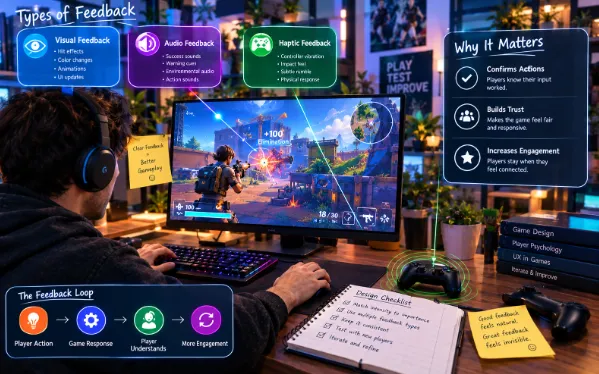
Player feedback is the invisible layer that makes a game feel responsive rather than lifeless. It’s easy to overlook because when it’s done well, players rarely notice it consciously, they just feel like the game reacts naturally to what they’re doing. When it’s missing or unclear, though, the effect is immediate and obvious, players feel disconnected from their own actions, unsure whether something worked, and eventually less engaged with the game as a whole.
Why Feedback Matters More Than It Seems
Feedback Confirms That Actions Matter
Every meaningful action a player takes needs some kind of response, whether that’s a visual effect, a sound, or a change in the game state. Without that confirmation, players start to feel like their inputs are disconnected from outcomes, even if the underlying mechanics are technically working correctly.
Good Feedback Builds Trust in the Game’s Systems
When a game consistently responds clearly to player actions, players develop trust that the systems are fair and predictable. That trust makes players more willing to experiment and take risks, since they can reasonably anticipate how the game will respond to what they try.
Common Feedback Mistakes
Feedback That’s Too Subtle to Notice
Some games include feedback that’s technically present but too quiet, too brief, or too visually minor for players to register during actual gameplay. Feedback that requires a player to be specifically looking for it usually isn’t strong enough to do its job.
Feedback That Doesn’t Match the Weight of the Action
A major achievement that produces the same small notification as a minor one can make important moments feel underwhelming. Feedback needs to scale with the significance of what actually happened, or players start to lose the ability to tell important moments apart from routine ones.
Delayed Feedback That Breaks the Connection
Even a small delay between an action and its feedback can make a response feel disconnected from what caused it. Immediate feedback, even if simple, tends to feel more satisfying than a more elaborate response that arrives a moment too late.
Types of Feedback Every Game Should Consider
Visual Feedback
Visual cues are often the fastest way to confirm an action, a flash, a particle effect, a change in color or animation. These cues work well because they can be processed almost instantly, even in fast-paced situations where a player doesn’t have time to read text.
Audio Feedback
Sound often communicates information even faster than visuals, especially in moments where a player’s eyes are focused elsewhere on the screen. A distinct sound for success, failure, or a specific action helps players understand what happened without needing to look directly at the source.
Haptic and Physical Feedback
Where available, physical feedback like controller vibration adds another layer of confirmation that can make actions feel more tangible. This kind of feedback is especially effective for high-impact moments, like a strong hit or a critical failure, where a physical sensation reinforces the significance of what happened.
Designing Feedback Systems That Actually Work
Match Feedback Intensity to Action Significance
A consistent hierarchy of feedback intensity helps players intuitively understand how important different events are. Small routine actions should have subtle feedback, while rare or significant moments deserve feedback that clearly stands out from the everyday responses players are used to seeing.
Layer Multiple Feedback Types for Important Moments
Combining visual, audio, and haptic feedback for particularly important events creates a stronger, more memorable response than relying on a single feedback type alone. This layering helps critical moments feel appropriately weighty compared to routine actions.
Keep Feedback Consistent Across Similar Actions
Players build expectations quickly based on how actions are typically confirmed. Inconsistent feedback for similar actions, where one type of success looks and sounds different from another similar success, can create confusion rather than clarity.
Testing Whether Feedback Is Actually Working
Feedback systems are notoriously difficult to judge from a developer’s own perspective, since they already know exactly what should be happening and are primed to notice cues that a new player might miss entirely.
Watching New Players Reveals Feedback Gaps
Observing someone playing a game for the first time often reveals feedback problems immediately, moments where a player pauses in confusion, repeats an action because they weren’t sure it worked, or misses an important event entirely because the feedback wasn’t clear enough.
Iterating Quickly on Feedback Adjustments
Once a feedback gap is identified, testing an adjustment quickly matters just as much as spotting the problem. Feedback often needs several small rounds of tuning, adjusting timing, intensity, or clarity, before it lands the way a designer intended.
A Platform That Supports Fast Feedback Iteration
Astrocade makes it easier to create a game and adjust feedback systems quickly, letting creators test different visual and audio cues without needing to rebuild core systems each time a response needs refining based on how players actually react to it.
Seeing Clear Feedback in a Real Game
Minecraft Gun City is a good example of a game where clear, immediate feedback matters heavily to the core experience. Fast-paced games built around direct action like this rely on players instantly understanding whether an action succeeded, which makes strong feedback design especially important to get right.
What Still Requires Human Judgment
Deciding What Deserves Emphasis
AI-assisted tools can help implement and test feedback quickly, but deciding which moments in a game truly deserve strong emphasis versus a subtler response is a creative judgment call that depends on understanding what actually matters to the experience.
Balancing Clarity Against Sensory Overload
Too much feedback across too many actions can overwhelm players just as much as too little feedback can leave them confused. Finding the right balance between clarity and restraint remains a design decision that requires careful attention to how a game feels as a whole.
Reading Player Confusion Correctly
Not all player confusion stems from missing feedback, sometimes it points to a different underlying issue entirely. Distinguishing between a genuine feedback gap and a separate design problem requires careful observation rather than assuming every point of confusion has the same cause.
Common Mistakes When Designing Feedback
Assuming Feedback That Makes Sense to the Developer Will Make Sense to Players
Developers who built a system already understand what a particular cue means, which can make it easy to overestimate how clear that same cue is to someone experiencing it for the first time.
Adding Feedback as an Afterthought
Feedback that gets bolted on late in development often feels disconnected from the actions it’s meant to support. Building feedback in alongside core mechanics from the start tends to produce a more cohesive, satisfying result.
Overcomplicating Simple Actions
Not every action needs elaborate feedback. Adding excessive visual or audio complexity to routine actions can create unnecessary noise that makes it harder for players to notice the feedback that actually matters.
A Practical Approach to Designing Better Feedback
A reasonable process looks like this. Map out the core actions in the game and rank them by how significant each one is to the overall experience. Design feedback intensity to match that ranking, keeping routine actions simple and reserving stronger, layered feedback for genuinely important moments. Test with players unfamiliar with the game, watching closely for moments of hesitation or confusion that reveal gaps in the feedback system. Iterate on timing, intensity, and clarity based on those observations rather than relying solely on internal judgment.
Final Thoughts
Good player feedback is easy to overlook precisely because it works quietly in the background, confirming actions and building trust without drawing attention to itself. Getting it right takes deliberate design and testing with people who don’t already know what to expect, but it’s one of the clearest ways to make a game feel responsive, satisfying, and worth continuing to play.
